
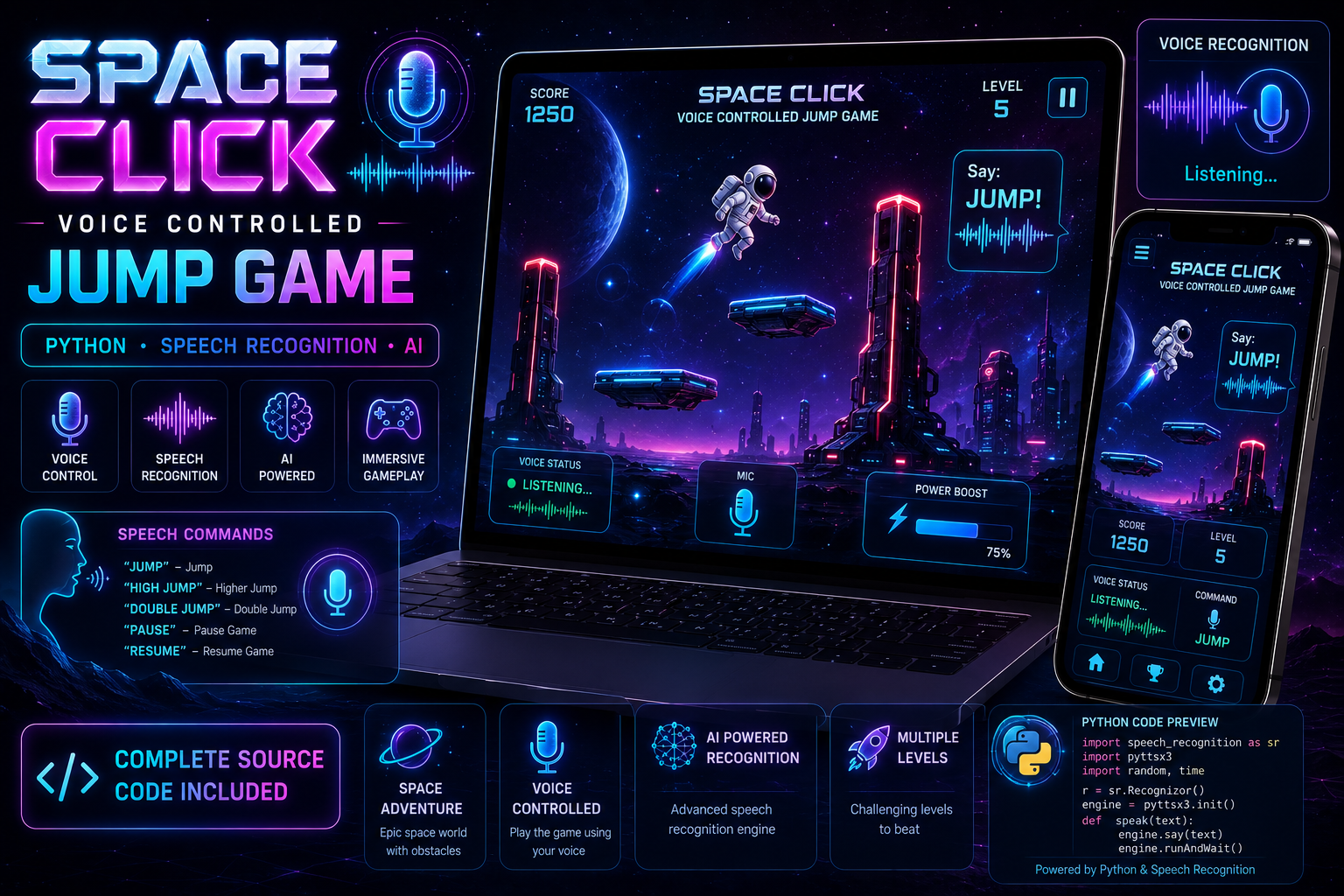
Space Click Voice Controlled Jump Game Using Python Source Code
Space Click is an innovative voice-controlled game developed using Python and Speech Recognition technology. Unlike traditional games that rely on keyboard controls, this project allows players to interact using voice commands such as “jump” and “up”.
The project combines Game Development, Artificial Intelligence, Speech Recognition, Multithreading, and Human Computer Interaction concepts into a single practical application. It provides hands-on experience with real-time voice processing and interactive game mechanics.
Key Features
- Voice-Controlled Gameplay
- Speech Recognition Integration
- Real-Time Voice Command Processing
- Jump Action Using Voice Commands
- Smooth 60 FPS Game Loop
- Multithreaded Speech Listener
- Real-Time Event Handling
- Interactive User Experience
- Python-Based Game Development
- Clean and Modular Code Structure
- Microphone Input Support
- Offline Voice Processing
- Student-Friendly Project
- Easy Customization
Technology Stack
- Python 3.x
- SpeechRecognition
- PyAudio
- Threading
- Queue Management
- Game Loop Programming
- Event Handling
- Voice Processing
Project Modules
1. Voice Recognition Module
Continuously listens to microphone input and converts speech into commands.
2. Command Processing Module
Analyzes voice commands and triggers game actions accordingly.
3. Game Engine Module
Handles game rendering, player movement, and real-time gameplay mechanics.
4. Multithreading Module
Runs speech recognition and gameplay simultaneously without affecting performance.
5. Event Handling Module
Processes user interactions and game events efficiently.
Project Workflow
- Game Starts
- Speech Listener Activates
- User Speaks Command
- Speech Recognition Converts Audio to Text
- Command Is Processed
- Player Performs Jump Action
- Game Continues in Real-Time
System Requirements
- Python 3.x
- SpeechRecognition Library
- PyAudio
- Microphone
- Windows, Linux, or macOS
Installation Guide
pip install SpeechRecognition
pip install pyaudio

python app.py
Learning Outcomes
- Speech Recognition Fundamentals
- Voice-Based User Interfaces
- Game Development Concepts
- Multithreading in Python
- Human Computer Interaction
- Real-Time Event Processing
- Artificial Intelligence Applications
- Interactive Software Development
- Voice Command Systems
- Python Programming Skills
Who Can Use This Project?
- BCA Students
- MCA Students
- B.Tech Students
- Computer Science Students
- Artificial Intelligence Students
- Machine Learning Learners
- Game Development Enthusiasts
- Final Year Project Students
- Portfolio Builders
Real-World Applications
- Voice Controlled Games
- AI Gaming Systems
- Interactive Learning Applications
- Accessibility-Based Controls
- Speech Controlled Software
- Human Computer Interaction Research
- Voice Assistant Integration
- Smart Entertainment Systems
Download Package Includes
- Complete Source Code
- Voice Recognition Modules
- Game Engine Files
- Installation Guide
- Project Documentation
- Run Instructions
Benefits of This Project
- Learn Speech Recognition
- Build Interactive AI Applications
- Understand Real-Time Processing
- Learn Python Game Development
- Create Unique Portfolio Projects
- Explore Human Computer Interaction
Future Enhancements
- Multiple Voice Commands
- Voice-Based Navigation System
- Advanced AI Opponents
- Multi-Level Gameplay
- Score Tracking System
- Voice Command Customization
- Multiplayer Mode
- Mobile Compatibility
- Deep Learning Speech Recognition
Why Choose This Project?
Space Click offers a unique combination of Artificial Intelligence, Speech Recognition, and Game Development. Students gain practical experience in developing voice-controlled systems while learning real-world AI implementation techniques.
Frequently Asked Questions (FAQs)
Q. Does the game support voice commands?
Yes, players can control the game using voice commands such as “jump” and “up”.
Q. Does it require a microphone?
Yes, a microphone is required for voice command input.
Q. Is internet required?
No, the project can run offline after installation.
Q. Is this suitable for final year projects?
Yes, it is an excellent AI and Python-based academic project.
Q. Can more voice commands be added?
Yes, the system can be extended with additional voice commands and actions.

Reviews
There are no reviews yet.